
Free & open sourceClaude Code plugin
AI Video Editor & Motion Graphics for YouTube
Tell Claude what you want in plain words. It cuts your raw recording, builds the motion graphics in your channel’s style and hands you a timeline to finish in Premiere Pro, Final Cut Pro or DaVinci Resolve.
- MIT license
- Mac or Windows
- No per-minute fees
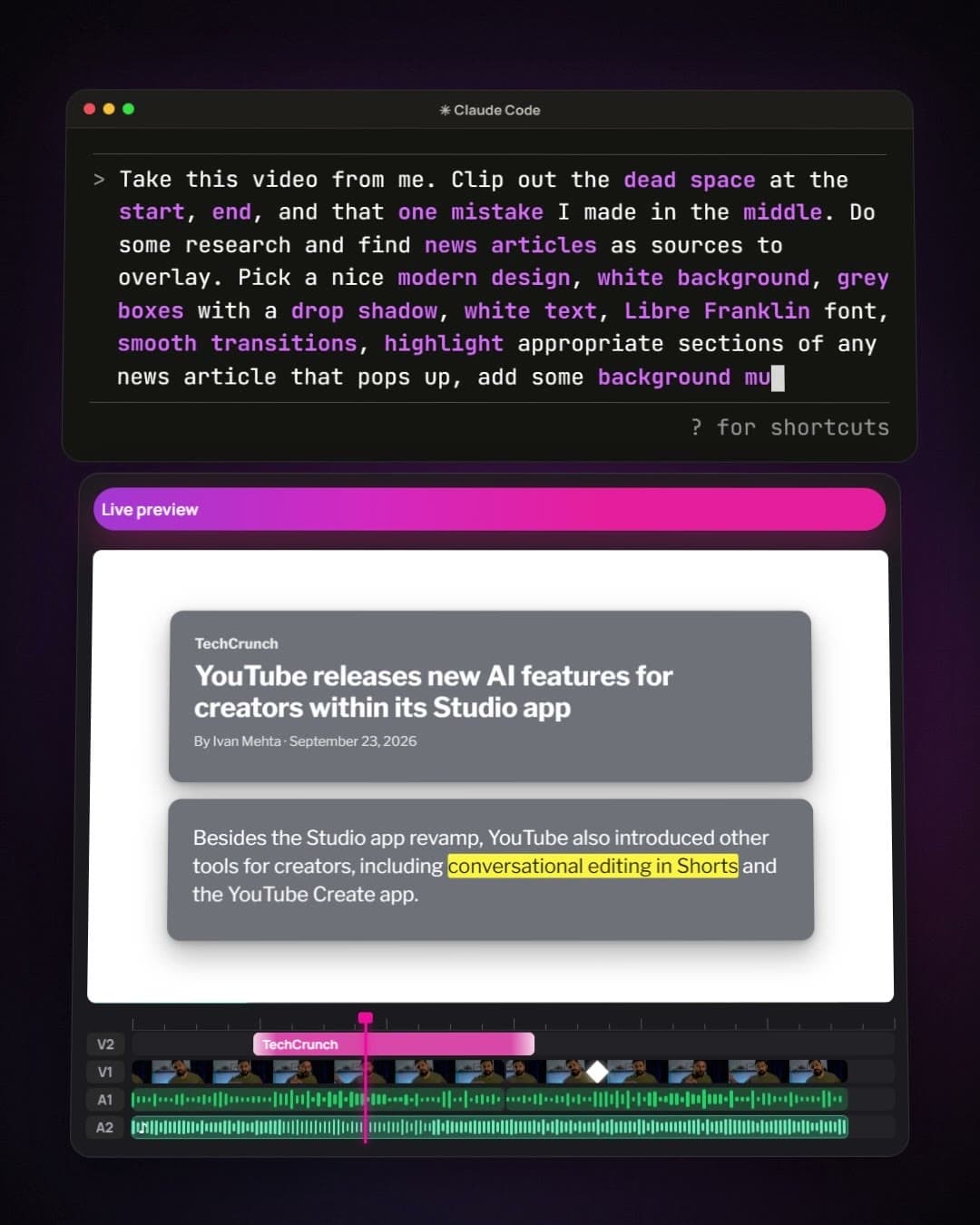
The demo: 3 minutes, with sound
What it does
You describe it. Claude edits it.
Claude does the technical work, from setup to render. You look, listen and approve.
Cuts your raw recording
False starts, flubs and retakes come out, each cut placed in a real pause. Your natural pauses stay, unless you want them tighter.
Motion graphics in your style
Title cards, lower thirds, charts and montages, plus news articles and X or Reddit posts rebuilt as sharp animated cards, each timed to the words it illustrates.
B-roll and sources, found for you
Just the seconds you need from a YouTube clip, plus photos, articles, posts and the data behind a chart. Every source is logged, and quotes and figures are never made up.
Voice and transcripts on your computer
Word-for-word transcripts with names spelled right, your voice mastered to YouTube’s loudness, and voiceovers in a voice you pick by ear.
A timeline you finish in your editor
Every cut and scene lands in Premiere Pro, Final Cut Pro or DaVinci Resolve, still adjustable, with a list of everything worth a second look.
Your channel’s look, every time
Colors, fonts, logo and animations are set once per channel. Claude remembers every video too, so a new chat picks up where you left off.
Who it’s for
Small creators and working editors
Use it as your editor, or as the assistant who does your first pass.
For small creators
Videos that look like a team made them
- No editing skills needed: describe a scene, or paste that part of your script.
- Share a YouTube link or a video file, and Claude matches its style.
- No recording? Claude can voice your script and time the scenes to it.
- No per-minute fees: the plugin is free, and the heavy lifting runs on your computer.
For video editors
Take on more videos, not more hours
- The first pass is done for you: the cut, inserts timed to the words, a mastered voice and, in Premiere, zooms and pans on the speaker.
- It lands in your editor as a normal timeline, so every cut stays yours to adjust.
- One brand kit per client: each channel keeps its own look, animations and rules.
- Grade one frame, and Claude builds a color LUT to match.
- A review list flags the judgment calls, the joins to listen to and every figure the screen corrects.
Step by step
From setup to a finished video
You talk to Claude in plain words, and it runs every command. Here’s how a project goes, and what to say at each step.
- 1
Install the plugin
Open Claude Code: the Code tab in the Claude desktop app, or the terminal. Enter these two lines, one at a time.
/plugin marketplace add tubeai-app/tubeai-skills/plugin install tubeai@tubeai-skills - 2
Set up your video project
Open Claude Code in an empty folder and ask. Claude checks your computer, lists everything it will install and asks once. Windows asks for permission a few times (click Yes); a Mac asks for your password.
Say
- Set up my video project
- 3
Add your channel
Share your channel’s name, logo, colors and fonts, or a video with the look you want. Claude proposes the style and a starter set of animations, like a title card and a lower third, and builds them once you say yes.
Say
- Add my channel
- Match the style of this video: …
- 4
Make a video
Paste part of your script for an animated scene, or hand over a raw recording: Claude transcribes it, proposes each graphic with the sentence it goes on, and cuts the mistakes once you approve the list.
Say
- Make a scene for this part: …
- Edit this recording: …
- 5
Preview and ask for changes
Everything plays in your browser before anything renders. Say what to change in plain words, and the preview updates by itself. A fix for the whole channel becomes a rule, so you only ask once.
Say
- Open the preview
- Bring the chart in when I say the number
- 6
Render or export
Get MP4s, transparent overlays, or a timeline for Premiere Pro, Final Cut Pro or DaVinci Resolve with every scene on its track. Next time, ask what’s next: Claude knows where every video stands.
Say
- Render it
- What’s next?
Know what to make next.
The video editor works on its own. Connect a free TubeAI account, and Claude also researches your next videos with you: outliers in your niche, the title formats that keep outperforming, transcripts of any public video and thumbnails in your channel’s style. Claude offers to connect it during setup.
We support small creators
Use your free monthly credits to take your channel to the next level with Hugo, your AI strategist: thumbnails, titles, viral ideas and more.